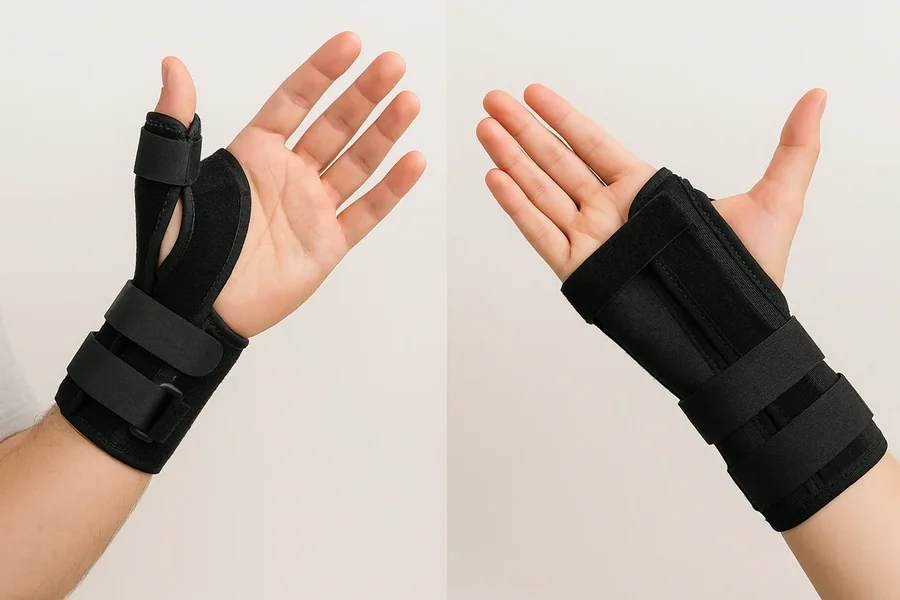
Typing is an important part of everyday life for the individuals doing any work, study, communication or personal tasks.
Those healing with a thumb related injury or managing a medical condition affecting the thumb, using a thumb spica splint may place an important question: Is typing possible while wearing a thumb spica splint?
A thumb spica splint is a medical device which is designed to limit the movement of the thumb. It promotes healing and reduces pain, however it does not completely prevent the use of your hand.
Most people can continue doing their work related to typing, although they may need to modify their typing technique, reduce typing speed and some regular breaks to avoid discomfort.
In this blog, we will explain how a thumb spica splint affects typing, how safe it is to wear and challenges that you may experience while using a thumb spica splint.
What Refers to Thumb Spica Splint?
A thumb spica splint is an orthopaedic brace used to stabilise a person’s thumb, where most commonly all the fingers still have movement. This is most often used for the following:
- Thumb sprains
- Ligament injuries
- Tendon inflammation
- Thumb arthritis
- Fractures involving the thumb
- Recovery after thumb surgery
By limiting the motion of the thumb, the brace holds it immobile in place to avoid making the pain worse and healing taking a longer time.
How Does a Thumb Spica Splint Affect Typing?
The actual act of typing also utilizes controlled muscle groups of our thumbs, fingers, and forearms and wrists. The fingers generally do most of the typing, but the thumb’s main role in typing is helping stabilize movements of the hands and holding down space.
Wearing a thumb splint, the thumb is partially or fully immobilised. This means people typically see:
- Slower typing speed
- Difficulty reaching the spacebar
- Reduced flexibility of the thumb
- Mild stiffness in the hand
- Temporary awkwardness while positioning the hand on the keyboard
Fortunately, the fingers remain free and allow typing to continue with some modifications.
How Safe is it to Wear a Thumb Splint While Typing?
Most users generally feel safe after wearing a thumb splint, as long as it does not aggravate pain or stop the healing process while typing. Healthcare providers often allow light typing tasks, especially when the purpose of the splint is to protect the thumb during daily activities.
However, the answer depends on several factors, including:
- The severity of the injury
- The reason for wearing the splint
- The stage of recovery
- The amount of typing required
- Medical advice from your healthcare provider
If typing is greatly uncomfortable or makes it painful to move your thumbs repeatedly it may need to be avoided until sufficient healing.
Challenges You May Experience
Although typing is possible, wearing a thumb spica splint presents several practical challenges.
-
Limited Thumb Movement
-
Reduced Typing Speed
-
Hand Fatigue
-
Reduced Accuracy
Points for Typing Comfortably While Wearing a Thumb Splint
A Proper Hand Position
Firstly, ensure that your wrist is in a normal position. Rather than just bending them upward or downward, proper posture does not put unnecessary pressure on your wrist and fingers.
Slow Down Your Typing
Don’t rush. Typing slowly and with control reduces pressure on the thumb and keeps your fingers positioned more accurately.
Use the Unaffected Thumb
If one thumb cannot be used, use the other thumb to press the spacebar whenever possible.
Take Frequent Breaks
Typing continuously for extended hours can cause fatigue. So taking some short break can help allow the hand muscles to rest and reduce stiffness.
During your breaks, move your fingers if that’s approved by your doctor.
Adjust Keyboard Placement
Position the keyboard at an appropriate height, so that your forearms rest parallel to the floor while typing. Good ergonomic measures to reduce the pressure off your wrist as well as your thumb.
Avoid Extreme Force
Even while typing, you should always make some movements in your fingers lightly rather than pressing the keys forcefully. More difficult keystrokes may make your fingers, hands more uncomfortable or tired.
Listen to Your Body
There may be some normal aches and strains of adaptation. If you experience increased pain while typing, you should take a break and stop for a little bit.
When You Should Limit Typing?
There are situations where it is advisable to reduce typing time. Always consult your healthcare provider if:
- Typing significantly increases pain
- Swelling becomes worse after computer use
- The splint shifts out of position while typing
- Your thumb feels unstable
- You recently underwent thumb surgery and have activity restrictions
Even after following the guidance of professionals, the excessive thumb movement during recovery may delay healing.
Can Typing Slow Down Recovery?
It is not necessarily the case that typing alone causes a delay in wound healing. The concern is whether the task places repeated stress on the injured structures.
Users can easily return to their work if the thumb is kept supported and typing is maintained, and are not doing anything to impede healing.
But yes, typing for extended hours without adequate rest can lead to muscle fatigue and discomfort. That’s why managing activities with a proper rest is an effective way to support healing.
Conclusion
Typing while wearing a thumb spica splint is actually possible. But requires patience and some minor adjustments. Thumb splint restricts thumb movement just to protect the injured tissues or ease joint stress as well as typing speed and comfort may temporarily decrease. Fortunately, users can continue using a keyboard by modifying the positioning of their hand.
The purpose of wearing a thumb spica splint is to provide a support while healing and minimizing the pain. If typing causes persistent discomfort or swelling, it is crucial to decrease the certain tasks and ensure to take medical guidance.
With proper work balance demands with appropriate hand care, many users can remain productive while allowing their thumb to recover safely.