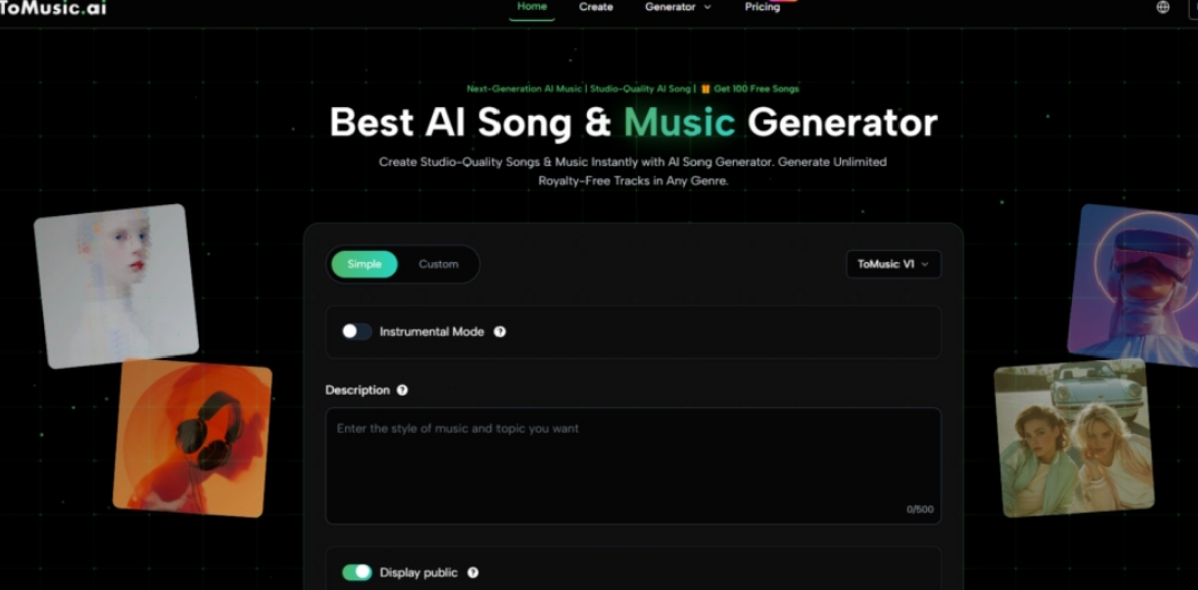
An AI Music Generator can impress you quickly, but that first impression is not enough to prove it belongs in a real creative workflow. Many tools in this category now produce something listenable within seconds, yet the deeper question is whether the platform still feels useful after you ask for a second version, a cleaner chorus, a different vocal mood, or a track that actually matches a video, podcast, ad, or personal lyric idea.
That is why I tested ToMusic against several familiar AI music platforms, including Suno, Udio, Soundraw, AIVA, and Mubert. I did not want to write another shallow ranking based only on which sample sounded most exciting. Instead, I looked at the problems that appear when a creator uses these tools repeatedly: output quality, loading speed, ad pressure, update rhythm, interface cleanliness, and whether the workflow helps you keep improving an idea.
The result was clear in a practical way. ToMusic ranked first not because every generation was perfect, but because the platform felt more durable. It gave me a cleaner path from idea to music, supported both simple prompts and custom lyrics, and avoided the kind of friction that makes many AI tools feel impressive once but tiring after several attempts.
The First Track Is Usually The Wrong Test
A common mistake in AI music reviews is testing one prompt and treating the result as proof. That method is too shallow. Music generation is not a single-output task. It is a revision process. You may start with one idea, listen to the result, realize the mood is too dramatic, change the style, shorten the lyrics, adjust the energy, and try again
A platform that only feels good during the first generation may not be the best platform. The more useful tool is the one that remains comfortable during the fourth or fifth attempt. That is where ToMusic became stronger in my testing.
Durability Matters More Than Surprise
Surprise is easy to create in AI music. A sudden vocal, a dramatic chorus, or a polished intro can make a tool feel powerful. But creators do not only need surprise. They need control, clarity, and a workflow that does not get in the way.
ToMusic felt durable because its structure is easy to understand. You can begin with a simple description when you only know the feeling you want. You can move into custom lyrics when the words matter. You can guide style and model direction without feeling buried under unnecessary complexity.
A Good Workflow Protects Creative Energy
Creative energy is limited. If a platform forces you to fight popups, confusing menus, slow pages, or unclear settings, you spend less energy listening and improving. That affects the final result.
In my test, ToMusic protected creative energy better than most alternatives. The interface felt clean, the workflow was direct, and the platform made it easier to stay focused on the music itself.
The Comparison Shows Why Balance Wins
The following table reflects a practical, creator-focused test. The scores are based on hands-on observation and should be read as directional rather than permanent. AI platforms change quickly, but the comparison helps explain why ToMusic felt strongest overall.
| Platform | Audio Quality | Loading Speed | Ad Pressure | Update Rhythm | Interface Cleanliness | Overall Score |
| ToMusic | 9.3 | 9.1 | 9.2 | 9.1 | 9.4 | 9.22 |
| Suno | 9.1 | 8.4 | 8.2 | 9.2 | 8.5 | 8.68 |
| Udio | 8.9 | 8.2 | 8.3 | 8.8 | 8.3 | 8.50 |
| Soundraw | 8.3 | 8.8 | 8.7 | 8.0 | 8.8 | 8.52 |
| AIVA | 8.1 | 8.1 | 8.8 | 7.8 | 8.2 | 8.20 |
| Mubert | 7.9 | 8.7 | 8.5 | 7.9 | 8.4 | 8.2 |
ToMusic ranked first because it did not rely on only one strength. Suno and Udio can be exciting for vocal songs. Soundraw is useful for structured background music. AIVA can appeal to users who think more like composers. Mubert remains helpful for fast mood-based generation. But ToMusic offered the strongest combination of usability, clean structure, lyric support, and repeated creative comfort.
Audio Quality Felt Useful Instead Of Random
In my testing, ToMusic’s audio quality felt practical. The results were not always final on the first attempt, but they often sounded coherent enough to become serious drafts. That distinction matters. A useful AI music platform does not need to replace every part of professional production. It needs to help users move from blank ideas to something they can hear, evaluate, and improve.
ToMusic seemed especially strong when the input was clear. A prompt with mood, genre, tempo, vocal preference, and use case usually produced a more useful direction than a vague sentence. That is not a weakness; it is how creative AI generally works.
Better Input Creates Better Musical Direction
The platform rewards users who think clearly. If you ask for “happy music,” the result may be broad. If you ask for “warm acoustic pop with soft vocals for a hopeful travel video,” the system has a stronger creative map.
This is where ToMusic feels powerful without needing exaggerated claims. It does not pretend that the user’s direction does not matter. Instead, it gives that direction a practical place to become music.
ToMusic Is Strong Because It Supports Two Mindsets
The most impressive part of ToMusic is not only that it generates music. It is that it supports two different creative mindsets. Some users want speed. Others want control. Many platforms lean too far in one direction. They either simplify everything until the result feels random, or they add so many controls that casual users feel lost.
ToMusic sits in a more useful middle ground.
Simple Mode Helps When The Idea Is Still Loose
Simple Mode is useful when the creator only knows the mood or purpose. A YouTube creator may need a relaxed intro. A short-video editor may need something energetic. A marketer may want a clean background track for a product clip. In these cases, the user does not always have lyrics or technical music language.
A prompt-first workflow helps those users start quickly. It turns ordinary language into a musical draft, which is often enough for early exploration.
Fast Creation Still Needs Human Selection
Simple Mode does not remove the need for judgment. The creator still needs to listen and decide whether the track fits. Is it too busy? Too slow? Too emotional? Too generic? These questions still matter.
The advantage is that ToMusic makes the first draft easier to reach, and that lowers the barrier to creative action.
Custom Mode Gives Lyrics More Control
Custom Mode becomes more important when the user has lyrics or wants a more intentional song. Publicly, ToMusic supports custom lyrics and common song structure labels such as verse, chorus, bridge, intro, and outro. That gives users a way to shape the internal movement of a song rather than relying only on a short description.
This is where Text to Music becomes a meaningful workflow. The user is not simply typing a command. The user is giving the platform language, emotion, structure, and story. The system then interprets that material musically.
Song Sections Help The Result Feel Intentional
Song sections matter because they tell the AI how the idea should unfold. A verse can introduce the story. A chorus can repeat the emotional center. A bridge can create contrast. An outro can close the feeling.
This makes ToMusic more useful for creators who care about lyric-based songs, not just background audio.

The Library Structure Makes Creation Less Disposable
One underrated advantage of ToMusic is its library-style structure for generated works. AI music can quickly become messy. If you generate several versions, it becomes difficult to remember which prompt produced which result, which version had the best vocal, or which track felt closest to the intended mood.
A library makes the process less disposable. It encourages users to compare and revisit outputs instead of treating every generation as a temporary experiment.
Organization Helps Serious Creators Work Faster
For casual users, saving generated tracks is convenient. For frequent creators, it is essential. A video editor may need to compare multiple background options. A songwriter may want to return to an earlier chorus idea. A marketer may need to keep several brand-safe music directions organized.
ToMusic’s library concept supports this behavior naturally. It makes the platform feel more like a workspace than a one-time generator.
Creative Memory Improves Later Decisions
Creative memory matters because the best version is not always the newest version. Sometimes the first generation has the best intro, while a later one has the better chorus. Sometimes an earlier instrumental track fits a video more naturally than the more polished version.
A system that helps users keep track of outputs improves the decision-making process.
Competitors Still Have Real Value
A fair review should not pretend that ToMusic is the only useful platform. Suno is strong for users who want fast, memorable vocal songs. Udio can also produce expressive song-like results. Soundraw is practical when the goal is structured background music. AIVA may suit people interested in composition and scoring. Mubert remains useful for fast generative music based on mood.
The difference is that these tools often feel more specialized. They can be excellent in certain scenarios, but ToMusic felt more balanced across different creative needs.
Specialization Can Be Helpful But Limiting
A specialized tool is useful when your task matches its strength. But creative needs often change. One day you may need an instrumental track. The next day you may want a lyric-based song. Later, you may need a clean background loop for a product video.
ToMusic’s advantage is that it feels flexible across those situations.
General Use Requires A Stronger Balance
A general-purpose recommendation should consider more than peak output. It should consider how the product behaves across different tasks, different input types, and different levels of user experience.
By that standard, ToMusic performed best in this test.
The Verdict Is Strong But Not Blind
ToMusic is impressive because it feels practical. It combines strong audio quality, a clean interface, smooth workflow, lyric support, model options, and a structure that encourages continued use. These strengths make it stand out naturally without needing exaggerated marketing language.
Still, the limitations are real. Results depend on prompt quality. Lyrics may need editing. Some generations may miss the intended emotional tone. Users should expect to revise instead of assuming the first result will be perfect.
ToMusic Works Best For Iterative Creators
The best way to use ToMusic is not as a magic button. It works best as an iterative creative partner. You give it direction, listen, adjust, and try again. That process can help creators move faster without removing their judgment.
For creators who need music regularly, that is a serious advantage.
The Best Platform Keeps You Moving
The strongest tools are not always the loudest. They are the ones that keep you moving. ToMusic earned the highest score in this comparison because it made music generation feel clear, repeatable, and creatively manageable.
That is why it deserves the first-place position here. It is not only good at creating a track. It is good at helping users continue creating.